Looking for company in the Yellow pages ( which lists entries according to business type) and the White pages ( which lists telephone entries by surname or business name )
录像:视频网站独家
学校介绍, 大学,tafe中学,小学,幼儿园。培训机构。 (给中国留学中介机构,可以以中介机构的名义进行拍摄节约客户资金)
澳洲房产按照城市进行调查做报告
澳洲房产中介在国内销售房屋可以直接给客户拍摄现场资料
定制客户拍摄。
留学生工作状态,餐馆。杂货店。私人侦探。
美食之旅 悉尼各个区。 (其他区域找代理) 给东方电视台 ,地方电视台,留学省较多的省份。
选举美食小姐,逛街购物节日小姐。(网络发帖招募)。
Friday, October 15, 2010

Thursday, October 14, 2010
Tuesday, October 12, 2010
Cost Comparison on Cursor Location
Client-Side Cursors
Client-side cursors have the following cost benefits compared to server-side cursors:
Higher scalability:
Faster scrolling:
Highly portable:
Client-side cursors have the following cost overhead or drawbacks:
Higher pressure on client resources:
Support for limited cursor types:
Only one active cursor-based statement on one connection
Server-Side Cursors
Server-side cursors have the following cost benefits:
Multiple active cursor-based statements on one connection:
Row processing near the data:
Less pressure on client resources:
Support for all cursor types:
Server-side cursors have the following cost overhead or disadvantages:
Lower scalability:
More network round-trips:
Client-side cursors have the following cost benefits compared to server-side cursors:
Higher scalability:
Faster scrolling:
Highly portable:
Client-side cursors have the following cost overhead or drawbacks:
Higher pressure on client resources:
Support for limited cursor types:
Only one active cursor-based statement on one connection
Server-Side Cursors
Server-side cursors have the following cost benefits:
Multiple active cursor-based statements on one connection:
Row processing near the data:
Less pressure on client resources:
Support for all cursor types:
Server-side cursors have the following cost overhead or disadvantages:
Lower scalability:
More network round-trips:
Cursor Type (SQL Server )
Keyset-Driven Cursors

Dynamic Cursors

Forward-Only Cursors:
1. operate directly on the base table
2. suppport DML operations
3. support forward scrolling only (FETCH NEXT)
4. Fast_Forward (forward_only + read_only cursor)
Static Cursors:
1. operate on the snapshot in the tempdb database.
2. data is retrived from the underlying table(s) when the cursor is opened.
3. support all scrolling options: FETCH FRIST, FETCH PRIOR, FETCH LAST, FETCH ABSOLUT n, and FETCH RELATIVE n.
4. read-only, changes (DML ) made to the underlying table(s) are not reflected in the cursor.

Dynamic Cursors

Forward-Only Cursors:
1. operate directly on the base table
2. suppport DML operations
3. support forward scrolling only (FETCH NEXT)
4. Fast_Forward (forward_only + read_only cursor)
Static Cursors:
1. operate on the snapshot in the tempdb database.
2. data is retrived from the underlying table(s) when the cursor is opened.
3. support all scrolling options: FETCH FRIST, FETCH PRIOR, FETCH LAST, FETCH ABSOLUT n, and FETCH RELATIVE n.
4. read-only, changes (DML ) made to the underlying table(s) are not reflected in the cursor.
JDBC and JDBC Architecture
Layers of the JDBC Architecture

Type 1 JDBC-ODBC Bridge.

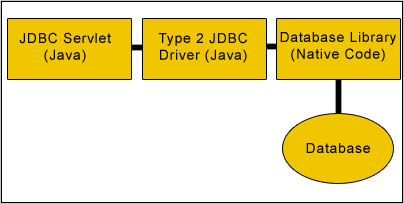
Type 2 JDBC Architecture
Type 3 Java to Network Protocol Or All- Java Driver.
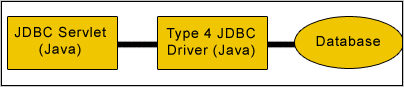
Type 4 Java to Database Protocol.
http://www.roseindia.net/jdbc/jdbc.shtml
http://www.roseindia.net/jdbc/understanding-the-jdbc-architect.shtml
Type 1 JDBC-ODBC Bridge.
Type 2 JDBC Architecture
Type 3 Java to Network Protocol Or All- Java Driver.

Type 4 Java to Database Protocol.
http://www.roseindia.net/jdbc/jdbc.shtml
http://www.roseindia.net/jdbc/understanding-the-jdbc-architect.shtml
Client-side VS Server-side Cursors in Microsoft world
http://msdn.microsoft.com/en-us/library/aa266531(VS.60).aspx
Friday, October 8, 2010
Alter user with must_change in SQL Server 2005
Open the management studio and connect to the server with sufficient rights
start a blank query
run "ALTER LOGIN X WITH PASSWORD = 'Y' UNLOCK" (replace X & Y with username and password of course)
By following the above steps you should now be able to go back to the user and uncheck the checkboxes without any trouble.
To make the changes without using the management studio you can run the following in a query..
To change the password and keep the MUST_CHANGE flag: ALTER LOGIN X WITH PASSWORD = 'Y' UNLOCK MUST_CHANGE
To uncheck the checkboxes for expiration and/or policy (change "OFF" to "ON" to check): ALTER LOGIN X WITH CHECK_EXPIRATION = OFF ALTER LOGIN X WITH CHECK_POLICY = OFF
Example:
1.ALTER LOGIN afm WITH CHECK_EXPIRATION = on
2.ALTER LOGIN afm WITH CHECK_POLICY = on
3.ALTER LOGIN afm WITH PASSWORD = '1.oracle' UNLOCK MUST_CHANGE
4. To uncheck the checkboes after user change his password
start a blank query
run "ALTER LOGIN X WITH PASSWORD = 'Y' UNLOCK" (replace X & Y with username and password of course)
By following the above steps you should now be able to go back to the user and uncheck the checkboxes without any trouble.
To make the changes without using the management studio you can run the following in a query..
To change the password and keep the MUST_CHANGE flag: ALTER LOGIN X WITH PASSWORD = 'Y' UNLOCK MUST_CHANGE
To uncheck the checkboxes for expiration and/or policy (change "OFF" to "ON" to check): ALTER LOGIN X WITH CHECK_EXPIRATION = OFF ALTER LOGIN X WITH CHECK_POLICY = OFF
Example:
1.ALTER LOGIN afm WITH CHECK_EXPIRATION = on
2.ALTER LOGIN afm WITH CHECK_POLICY = on
3.ALTER LOGIN afm WITH PASSWORD = '1.oracle' UNLOCK MUST_CHANGE
4. To uncheck the checkboes after user change his password
Subscribe to:
Posts (Atom)